image-cgroupsv2-inspector 2.5: Registry mode, Go scanning, deep-scan, and HTML reports
Back in March I introduced image-cgroupsv2-inspector, a tool I built to scan an OpenShift cluster and identify container images whose Java, Node.js, or .NET runtimes are not compatible with cgroups v2. Since then the tool has grown substantially based on real engagements with customers who needed more than a simple cluster-level check: pre-deployment registry audits, Go workloads, images with hand-written cgroup v1 shell code, multi-day scans on large registries, and shareable reports for non-technical stakeholders.
This post walks through everything that landed between v1.0 and the current v2.5.0 release.
What’s new at a glance
| Feature | Release | Purpose |
|---|---|---|
| Quay registry scan mode | v2.0 | Scan images directly from a Quay registry, without an OpenShift cluster |
| Unified CSV schema | v2.0 | Single schema covering both OpenShift and registry scans |
Unknown compatibility status |
v2.1 | Distinguish “binary found but version unreadable” from “incompatible” |
--image-timeout |
v2.2 | Per-image pull+scan deadline to avoid hangs on huge or broken images |
--resume |
v2.2 | Resume interrupted scans without re-processing already-analyzed images |
--deep-scan |
v2.3 / v2.4 | Heuristic detection of cgroup v1 references in scripts and binaries |
| Go binary scanning | v2.5 | Deterministic Go cgroups v2 compatibility via go version -m |
| HTML report | v2.5 | Self-contained, interactive HTML report alongside the CSV |
The CSV schema has been extended in a backward-compatible way: new columns have been added, existing columns retain the same meaning, so any spreadsheet or script built against v1 output still works.
New: Quay registry scan mode
The v1.0 tool could only scan a running cluster. That’s fine for a post-deployment audit, but customers were asking for the opposite workflow too: check what’s sitting in our Quay registry before anyone deploys it, so we can fix it at the source.
v2.0 introduces a dedicated registry scan mode that connects to a Quay registry via its REST API, enumerates repositories and tags in an organization, and then runs the same image analysis pipeline used by OpenShift mode.
The two modes are mutually exclusive, selected by the presence of --registry-url (registry mode) or --api-url / .env credentials (OpenShift mode):
| OpenShift mode | Registry mode | |
|---|---|---|
| Data source | Running workloads | Quay REST API |
| Authentication | Bearer token (oc whoami -t) |
Quay Application Token |
| Discovery | Cluster API queries | Org/repo/tag enumeration |
| Image analysis | Same (podman pull + binary scan) | Same |
| Use case | Post-deployment audit | Pre-deployment / registry hygiene |
Authentication
Registry mode requires a Quay Application Token (OAuth). Robot accounts are not supported because the tool needs REST API access for listing organizations and repositories, which is an Application Token-only capability.
To create one: Quay UI → Organization → Applications → Create New Application → Generate Token. Grant:
- View all visible repositories
- Read User Information
The same token is used to generate an auth.json on the fly for podman pulls, so there’s no separate credential setup.
Basic usage
$ ./image-cgroupsv2-inspector \
    --registry-url https://quay.example.com \
    --registry-token <TOKEN> \
    --registry-org myorg \
    --rootfs-path /tmp/images \
    --analyze
Tag filtering
Large registries have thousands of tags, and most of them are not worth scanning (dev snapshots, RCs, old releases). Three CLI options narrow the scope:
# Only include release tags
$ ./image-cgroupsv2-inspector ... --include-tags "v*,release-*"

# Exclude dev/snapshot/rc tags
$ ./image-cgroupsv2-inspector ... --exclude-tags "*-dev,*-snapshot,*-rc*"

# Only the 3 most recent tags per repository
$ ./image-cgroupsv2-inspector ... --latest-only 3

# Combine them
$ ./image-cgroupsv2-inspector ... \
    --exclude-tags "*-dev,latest" \
    --latest-only 5
Filters are applied in order: include patterns (default *) → exclude patterns → sort by push date → --latest-only cap.
A single repository
If you’re iterating on one specific image, --registry-repo skips the org-wide enumeration:
$ ./image-cgroupsv2-inspector \
    --registry-url https://quay.example.com \
    --registry-token <TOKEN> \
    --registry-org myorg \
    --registry-repo myapp \
    --rootfs-path /tmp/images \
    --analyze
CSV output in registry mode
The unified schema adds three columns relevant here:
source:"openshift"or"registry"— lets you keep OpenShift and registry scan results in the same spreadsheetregistry_org: organization name (empty in OpenShift mode)registry_repo: repository name (empty in OpenShift mode)
OpenShift-specific columns (namespace, object_type, object_name, container_name) stay empty for registry rows, and vice-versa.
New: Go binary scanning
The v1 tool covered Java, Node.js, and .NET. Go was conspicuously missing, and it matters: the Go runtime has its own history with cgroups v2 (proper support landed in Go 1.19), and many OpenShift workloads — operators, sidecars, cAdvisor-style agents — are Go binaries.
v2.5 adds deterministic Go scanning. When the go command is available on the host, the tool automatically:
- Resolves the image’s ENTRYPOINT and CMD from
podman inspect - Runs
go versionon each candidate binary to identify Go executables - Runs
go version -mto extract the compiled-in module list - Applies a deterministic compatibility matrix based on Go version and v2-aware module presence
Use --disable-go to opt out even if go is on PATH.
Compatibility matrix
| Go version | Modules | Result | Reason |
|---|---|---|---|
| ≥ 1.19 | (any) | Compatible | Go runtime natively supports cgroups v2 since 1.19 |
| < 1.19 | v2-aware module at sufficient version | Compatible | Module provides cgroups v2 support |
| < 1.19 | v2-aware module below minimum | Needs Review | Module present but too old |
| < 1.19 | No v2-aware modules | Not Compatible | No cgroups v2 support detected |
The v2-aware modules the tool knows about:
| Module | Minimum version |
|---|---|
go.uber.org/automaxprocs |
v1.5.0 |
github.com/KimMachineGun/automemlimit |
v0.1.0 |
github.com/containerd/cgroups |
v1.0.0 |
github.com/opencontainers/runc/libcontainer/cgroups |
v1.1.0 |
Why deterministic matters
An earlier iteration of Go detection relied on strings + regex against the binary. That approach had a high false-positive rate: compiled Go binaries often contain the string memory.limit_in_bytes as part of the cgroups module’s internal detection logic — the binary handles cgroup v1, it doesn’t require it. The go version -m approach reads the actual build metadata embedded by the Go toolchain, so “did this binary link in automaxprocs v1.6.0?” is a yes/no question rather than a heuristic.
New CSV columns
go_binary: paths to Go binaries found in ENTRYPOINT/CMDgo_version: detected Go version(s), e.g.go1.22.5go_cgroup_v2_compatible:Yes/No/Needs Review/Nonego_modules: pipe-separated v2-aware modules with versions (only cgroup-relevant ones are listed, not the full dep tree)
The deprecated deep_scan_go_cgroup_libs column from v2.4 has been removed in v2.5.
New: deep-scan heuristic
Version-based checks catch the vast majority of incompatibilities, but they miss an important category: images whose entrypoint scripts or custom binaries read cgroup v1 files directly. A typical example is a shell wrapper that computes heap size from /sys/fs/cgroup/memory/memory.limit_in_bytes before exec’ing the JVM. The JVM itself may be a modern version, but the script breaks on cgroup v2 because that file no longer exists.
--deep-scan (introduced in v2.3, expanded in v2.4) is a heuristic layer that looks for cgroup v1 path references in entrypoint scripts and binaries. It’s meant to complement, not replace, the version checks.
Confidence levels
Heuristic findings are tagged with a confidence level so they can be triaged:
| Level | Source | Meaning |
|---|---|---|
| high | Entrypoint script | cgroup v1 paths directly in ENTRYPOINT/CMD. Someone intentionally hardcoded v1 paths. You know exactly which file to fix. |
| medium | Sourced script | cgroup v1 paths in a script reached via source / . / exec from the entrypoint. One level of indirection — the function may not always be invoked. |
| low | Binary (strings) |
cgroup v1 paths found by running strings on a compiled binary. Weakest signal — strings may exist for v2 detection logic, error messages, or documentation. Always pair with deep_scan_v2_aware. |
v2.4 added exec-chain following on top of source-chain following, so an entrypoint that does exec /usr/bin/mybinary has the referenced binary scanned too. Source chains are followed up to depth 5, script size 1 MB, with symlink escape protection.
v2-aware detection
Many well-maintained images handle both cgroup versions at runtime:
if [ -f /sys/fs/cgroup/cgroup.controllers ]; then
    # cgroup v2 path
    MEM=$(cat /sys/fs/cgroup/memory.max)
else
    # cgroup v1 fallback
    MEM=$(cat /sys/fs/cgroup/memory/memory.limit_in_bytes)
fi
When the deep-scan finds cgroup v1 patterns in a file that also contains v2 patterns (memory.max, cpu.max, cgroup.controllers), the image is flagged as v2-aware (deep_scan_v2_aware=true). These are typically safe on both v1 and v2 clusters.
The triage logic then simplifies to one filter on the CSV:
deep_scan_match == "true" AND deep_scan_v2_aware == "false"
Those are the rows that actually need remediation.
Example output
🔬 Analysis Results:
   Java found in: 0 containers
   Node.js found in: 0 containers
   .NET found in: 0 containers
   Go found in: 5 containers
     ✓ cgroup v2 compatible: 3
     ✗ cgroup v2 incompatible: 1
     ⚠ cgroup v2 needs review: 1
   Deep-scan matches: 3 images with cgroup v1 references
     ⚠ high confidence: 1
     ⚠ low confidence: 2
     ✓ v2-aware (dual v1+v2 support): 2
     ✗ v1-only (likely incompatible): 1
   Images skipped (timeout): 0
New CSV columns
deep_scan_match:"true"/"false"/ empty (not scanned)deep_scan_confidence:"high"/"medium"/"low"deep_scan_sources: pipe-separated files where matches were found (e.g./entrypoint.sh|/opt/helpers.shorbinary:/usr/bin/cadvisor)deep_scan_patterns: pipe-separated cgroup v1 patterns matched (e.g.memory.limit_in_bytes|cpu.cfs_quota_us)deep_scan_v2_aware:"true"/"false"/ empty
New: --image-timeout
On a large Quay organization it’s common to hit one image that hangs during pull — a bad manifest, a flaky mirror, a 50 GB dev container nobody cleaned up. Without a deadline, the whole scan blocks indefinitely.
--image-timeout sets a per-image deadline in seconds for the full pull-plus-scan operation. The default is 600 (10 minutes). When an image exceeds the limit it is skipped with a warning, recorded in the state file under timeout_images, and the tool exits with code 2 at the end so automation can react.
# 2-minute per-image deadline
$ ./image-cgroupsv2-inspector \
    --rootfs-path /tmp/images \
    --analyze \
    --image-timeout 120
Pairing --image-timeout with --resume (below) is the recommended pattern for multi-day scans: timeouts are retried automatically on the next run.
New: --resume
A scan over 4,900 images takes hours. If the network drops, the host reboots, or someone Ctrl-C’s the wrong terminal, restarting from scratch is painful.
--resume skips images already processed in a previous run. The mechanism:
- A JSON state file is written atomically after each image, named
.state_<target>.json(e.g..state_ocp-prod.jsonor.state_quay.example.com.json) - The state file tracks three buckets:
completed_images,error_images,timeout_images - On resume, completed images are skipped; errors and timeouts are retried (the assumption is that the underlying issue may have been transient)
- Analysis results from the previous run are restored into the same CSV file, so everything accumulates in one output
# First run — interrupted after 2000 of 4900 images
$ ./image-cgroupsv2-inspector --rootfs-path /tmp/images --analyze

# Resume — skips 2000 completed, scans remaining 2900 plus retries errors/timeouts
$ ./image-cgroupsv2-inspector --rootfs-path /tmp/images --analyze --resume

# Custom state directory (e.g. on persistent storage)
$ ./image-cgroupsv2-inspector --rootfs-path /tmp/images --analyze \
    --resume --state-dir /var/tmp/scan-state

# Wipe state to force a fresh scan
$ ./image-cgroupsv2-inspector --clean-state

# Wipe state by target name, no connection required
$ ./image-cgroupsv2-inspector --clean-state ocp-prod
--clean-state deletes the state file and exits with code 0. Giving it a target name (e.g. --clean-state ocp-prod) skips the cluster/registry connection entirely, so it works offline.
Running --resume without a prior state file prints a warning and falls back to a full scan — safe by default.
New: HTML report
A CSV is great for an engineer, but not for sharing with application teams who just want to know whether their workloads are safe. v2.5 adds an HTML report that’s generated alongside the CSV.
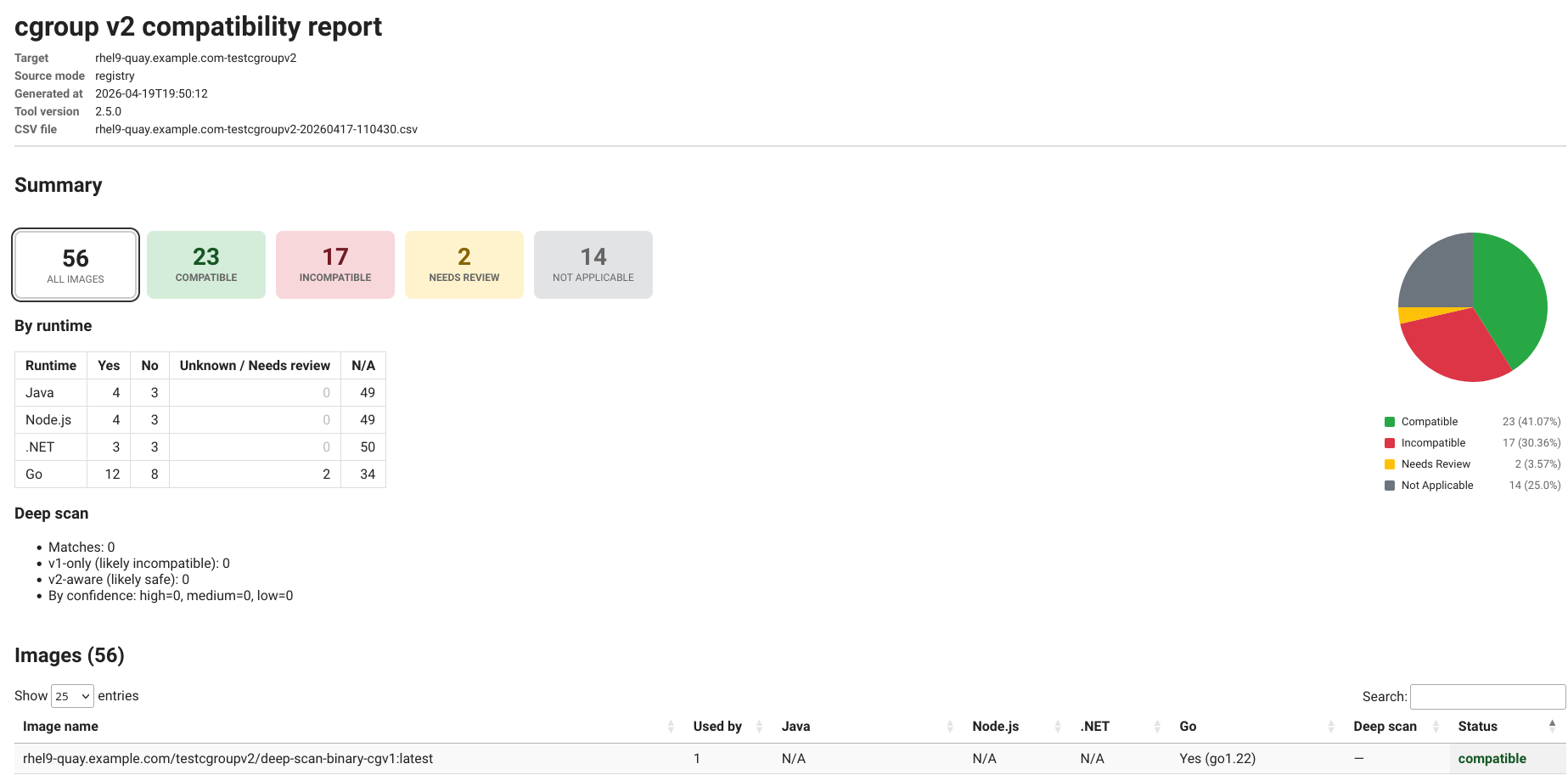
The report includes:
- Summary cards: totals by status (Compatible, Incompatible, Needs Review, Not Applicable). Cards are clickable and filter the table below.
- Interactive pie chart of the status distribution
- Per-runtime breakdown table: counts of Yes / No / Unknown-or-Needs-review / N/A for Java, Node.js, .NET, and Go
- Deep-scan summary: matches, v1-only vs v2-aware, confidence breakdown
- Images table powered by DataTables: sortable, searchable, with per-runtime drill-down filters and an expandable view showing which workloads consume each image
- Metadata header: target, source mode (openshift / registry), generated timestamp, tool version, source CSV filename
Usage:
# Generate HTML alongside CSV during a scan
$ ./image-cgroupsv2-inspector --rootfs-path /tmp/images --analyze --html-report

# Regenerate HTML from an existing CSV (offline, no scan, no cluster)
$ ./image-cgroupsv2-inspector --report-only output/mycluster-20260417-120000.csv

# Custom output location
$ ./image-cgroupsv2-inspector --report-only output/scan.csv --output-dir /tmp/reports
The HTML is fully self-contained — all JavaScript and CSS are inlined. This matters in air-gapped environments where the browser used to view the report has no internet access. Open it from a local filesystem, email it as an attachment, drop it into a SharePoint site; it works.
--report-only is a pure offline transformation: no cluster connection, no registry authentication, no image pulls. You can run it on any machine that has a copy of the CSV, which is useful for re-generating the report after the scan has been archived.
The not_applicable overall status in v2.5 replaces the old unknown fallthrough for images where no Java/Node/.NET/Go binary is found at all — those are not “unknown” in any meaningful sense, they’re simply out of the runtimes-we-check scope.
Putting it all together
A real-world command that exercises most of the new features — pre-deployment audit of a Quay organization, with deep-scan, HTML report, timeout, and resume:
$ ./image-cgroupsv2-inspector \
    --registry-url https://rhel9-quay.example.com \
    --registry-token <TOKEN> \
    --registry-org testcgroupv2 \
    --rootfs-path /tmp/cgroup \
    --analyze \
    --deep-scan \
    --html-report \
    --image-timeout 300 \
    --resume \
    --latest-only 5 \
    --exclude-tags "*-dev,*-snapshot" \
    -v
What this does:
- Connects to Quay via Application Token (
--registry-url+--registry-token) - Enumerates the
testcgroupv2organization, applies tag filters (--latest-only 5,--exclude-tags) - For each image: pulls, extracts, runs Java/Node/.NET version checks, runs Go deterministic analysis, runs the deep-scan heuristic
- Writes the CSV incrementally and a JSON state file after each image
- Skips any image that exceeds 300 seconds (exit code
2at the end if any were skipped) - Resumes from the previous run if one was interrupted
- Generates an HTML report at
output/html/rhel9-quay.example.com-testcgroupv2-<timestamp>.html
Upgrading from v1
The good news: nothing breaks. The CSV schema only gained columns, CLI flags from v1 still work as they did, and the default behavior (OpenShift mode, no deep-scan, no HTML) matches v1 exactly.
Things worth knowing when you update:
- If Go is installed on the host, Go scanning is on by default. Pass
--disable-goto match old output exactly. - The new CSV columns (
source,registry_org,registry_repo,go_*,deep_scan_*) appear even in OpenShift mode; they’re just empty when not applicable. - Existing spreadsheets / dashboards should still render correctly, but new rows may have more columns than the headers parsed at import time — re-import if you see alignment issues.
- The deprecated
deep_scan_go_cgroup_libscolumn from v2.4 has been removed. Go module info now lives ingo_modules. - A previous state file (
.state_*.json) written by an older version may not include the new buckets (timeout_images, etc.). If you see odd resume behavior,--clean-stateand start fresh.
Wrapping up
The tool has moved from “scan a cluster, print a CSV” to a small toolkit for the whole cgroups-v2-migration workflow: audit what’s deployed, audit what’s in the registry, generate shareable reports, resume multi-day scans, and catch the long tail of hand-rolled cgroup v1 code that version checks alone miss.
The source is on GitHub: image-cgroupsv2-inspector. Issues, PRs, and feature requests welcome.
For the background on why any of this matters for Java, Node.js, and .NET workloads, the Red Hat Developers article is still the best single reference: How does cgroups v2 impact Java, .NET, and Node.js on OpenShift 4?.